Free Invoice Template for Freelancers (+ A Better Alternative)
Download our free, professional invoice template for freelancers. Learn key fields, payment terms, and billing tips to get paid on time every time.
BT
Bizcalc Team
·April 21, 2026
Quick Answer & Key Summary
Quick Answer: A professional freelancer invoice template establishes clear contractual payment terms, details billable milestones or hourly breakdowns, and includes essential tax identification numbers to ensure prompt corporate client payment.
• Key Formula / Standard:Standard Terms: 'Net 14' or 'Net 30' with a 1.5% late payment penalty fee per month past due • Rule of Thumb / Benchmark: Freelancers sending invoices within 24 hours of project completion get paid an average of 14 days faster.
You just finished a project. The client is happy. Now comes the part that every freelancer quietly dreads — sending the invoice.
If you are a new freelancer, you might be tempted to grab the first free invoice template you find on Google, paste it into Word, and fire it off. But a poorly formatted invoice — one that is missing key information, looks unprofessional, or fails to meet basic business documentation standards — does more damage than most freelancers realize. It delays payment, raises questions about your credibility, and in some cases, can even affect your standing with the IRS.
This guide covers everything you need to know about creating a professional freelancer invoice: what must be on it, what the IRS expects, common mistakes that delay payment, and why a free online invoice generator beats a Word template every single time.
🧾
Free Invoice Generator
Skip the templates. Generate a clean, professional PDF invoice in seconds. Auto-calculates totals and requires no account to use.
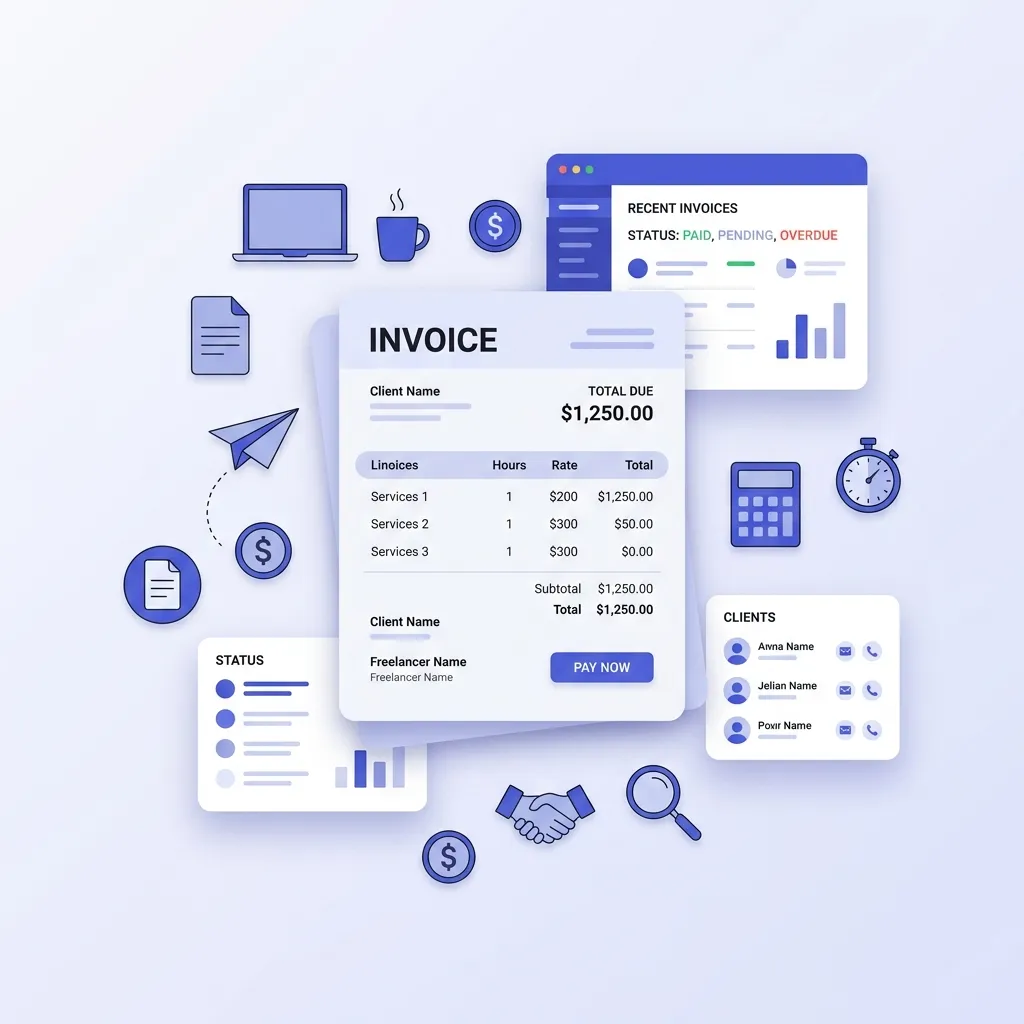
A freelancer invoice is a formal request for payment sent from an independent contractor or self-employed professional to a client after work has been completed (or, in some cases, as a deposit request before work begins). It is the primary financial document that records the transaction between you and your client.
Unlike employees — who receive a paycheck generated by their employer's payroll system — freelancers are responsible for creating and issuing their own invoices. This means you are effectively running a small billing department on top of whatever service or skill you are selling.
A properly constructed freelancer invoice serves several important purposes:
It legally requests the payment owed to you
It creates a documented paper trail for your business records
It establishes the payment terms your client has agreed to
It provides the documentation you need for accurate tax filing
Without proper invoicing, freelancers lose money in three ways: late payments because the client lost track of what they owe, underpaid taxes because records are incomplete, and disputes about project scope or pricing because nothing was formally documented.
What Every Freelancer Invoice Must Include
Before we get to templates, it is worth being specific about what belongs on a professional freelancer invoice. This is the information that protects you legally, satisfies IRS record-keeping requirements, and gives your client everything they need to process payment without delays.
Your Business Information
At the top of the invoice, include:
Your full legal name (or your business name if you operate under a DBA — "doing business as")
Your business address or mailing address
Your phone number and/or email address
If you have an EIN (Employer Identification Number), include it here. If you operate as a sole proprietor and do not have an EIN, your SSN is used for tax purposes but should never appear on an invoice — leave the tax ID field blank or use an EIN instead
Client Information
Client's full legal name or company name
Client contact name (the person you are billing, if different from the company)
Client's billing address
Invoice Header Details
Invoice Number: A unique sequential identifier (e.g., INV-001, INV-002). This is critical for record-keeping and referencing in follow-up communications
Invoice Date: The date you issued the invoice
Due Date: The date by which payment is expected. "Due upon receipt" is vague — a specific date is always better
Project or PO Reference: If the client provided a purchase order number or project reference, include it. Enterprise clients especially require this to process payment
Line Items — The Body of the Invoice
Each service, deliverable, or expense should appear as a separate line item:
Description: Be specific. "Website design — Homepage and About page" is better than "Web design." Clear descriptions reduce disputes and accelerate payment approval
Quantity or Hours: How many hours, units, or deliverables
Rate: Your hourly rate or per-unit price
Line Total: Quantity × Rate
Totals Section
Subtotal: Sum of all line items before tax
Sales Tax (if applicable): Whether freelancers charge sales tax depends on the nature of the service, your state, and the client's location. Services are generally not taxable in most states, but some states tax specific professional services. When in doubt, consult a CPA
Total Due: The full amount the client owes
Payment Instructions
This is the section that actually gets you paid — yet many freelancers omit it or make it vague:
Accepted payment methods (bank transfer, ACH, check, PayPal, Venmo for Business, credit card via Stripe, etc.)
Your bank account details or payment link if accepting ACH or wire transfer
Check payable to name and mailing address if accepting checks
Terms and Conditions (Optional but Recommended)
A brief notes section can include:
Late payment policy ("A 1.5% monthly fee applies to invoices unpaid after 30 days")
Any retainer or deposit terms
A short thank-you or personal note
Free Invoice Template Options — and Their Limitations
Let us look at the most common free invoice template options freelancers use, and why each has meaningful drawbacks.
Microsoft Word / Google Docs Templates
Pros: Familiar interface, free, easy to customize with your branding.
Cons:
You have to manually calculate every total — and manual math errors are embarrassingly common on client invoices
No automatic invoice numbering — freelancers frequently duplicate numbers or lose track of their sequence
Formatting breaks easily. A Word doc that looks perfect on your screen may display completely differently on the client's machine
No record-keeping. Once you send it, it is gone unless you manually save a copy somewhere organized
PDFs exported from Word vary in quality and can appear unprofessional
Excel / Google Sheets Templates
Pros: Auto-calculates totals, can be customized with formulas.
Cons:
Still requires manual invoice numbering and tracking
Spreadsheet files sent to clients look unprofessional — clients expect a PDF, not a .xlsx file
You need to export to PDF manually each time
Version control is a nightmare if you make any edits after sending (easy to inadvertently send the wrong version)
No payment status tracking — you have no way to see what is paid and what is outstanding
Free Invoice PDF Templates (Downloaded)
Pros: Looks like a finished invoice, PDF format.
Cons:
Static documents — you cannot edit them without Adobe Acrobat or a third-party tool
No personalization or branding
Often contain watermarks or the template creator's branding in free versions
No calculation — you manually enter every number
The Better Alternative: A Free Online Invoice Generator
A free online invoice generator like the one built into Bizcalc eliminates every limitation of the template approaches above:
🧾
Free Invoice Generator
Auto-calculate totals, generate sequential invoice numbers, and download a professional PDF instantly without watermarks.
Auto-calculates all line item totals, subtotals, and tax — zero math errors
Auto-generates sequential invoice numbers so you never duplicate or skip one
Outputs a clean, professional PDF instantly — no formatting issues across devices
No watermarks on the downloaded PDF
No account required — open it, fill it in, download your PDF
Your data stays private — all processing happens locally in your browser. Nothing is stored on any server
Saves your business details locally so your name, address, and branding are pre-filled from the second invoice onwards
The time difference is dramatic: a Word template invoice takes 10–15 minutes to complete and format. A generated invoice takes under 2 minutes.
Step-by-Step: How to Create a Freelancer Invoice in Under 2 Minutes
Here is exactly how to use Bizcalc's free invoice generator to create and send a professional invoice.
Step 1: Set Up Your Business Profile
Open the invoice generator and click the settings icon to enter your business details:
Your name or freelance business name
Your address
Your email address and phone number
Upload your logo if you have one (optional but strongly recommended — it signals professionalism immediately)
Choose your brand accent color
This is a one-time setup. From your second invoice onwards, all of this is pre-filled automatically.
Step 2: Enter Your Client's Details
In the "Bill To" section:
Client's company name (or individual name for direct clients)
Contact name
Billing address
Email address (used for your own records)
Step 3: Set the Invoice Number, Date, and Due Date
Invoice Number: The generator auto-assigns the next number in sequence. You can override it if you need to match a specific numbering format
Invoice Date: Defaults to today
Due Date: Set your payment terms here. Net 30 (30 days from invoice date) is the US freelance standard. For smaller projects or new clients, Net 15 or "due on receipt" is reasonable
PO Number: If your client gave you a purchase order number, enter it here — enterprise clients will not process your invoice without it
Step 4: Add Your Line Items
Click "+ Add Line Item" for each service:
Description: Be specific. "Brand identity design — logo, color palette, and typography guide" rather than "Design work"
Quantity: Hours worked or number of deliverables
Rate: Your hourly rate or flat fee per unit
The line total calculates automatically
Add as many line items as your project requires. If you are billing for reimbursable expenses (travel, software, printing), add these as separate line items with a clear description.
Step 5: Review Totals and Add Payment Instructions
The subtotal and any applicable tax total automatically. Review everything, then drop into the Notes field:
Your preferred payment method(s) and payment details
Any late payment fee policy
A brief thank-you note (genuinely increases on-time payment rates)
Step 6: Download and Send
Click "Download PDF" — your completed, professional invoice downloads instantly with no watermark. Email it directly to your client, or attach it to whatever project management or communication tool you use.
What Payment Terms Should Freelancers Use?
Payment terms are one of the most consequential decisions on your invoice — and one of the most frequently overlooked. Here is a practical guide:
Term
Meaning
Best For
Due on Receipt
Payment expected immediately upon delivery
Small projects under $500, trusted repeat clients
Net 15
Payment due within 15 days
Small-to-mid projects, new clients you want to move quickly
Net 30
Payment due within 30 days
Standard US business practice, mid-to-large projects
Net 60
Payment due within 60 days
Large enterprise clients (this is what they often require)
50% upfront / 50% on delivery
Half paid before work starts
New clients, large projects, specialized work
Pro tip: Net 30 is the standard most US businesses expect and process invoices around. If you want faster payment without seeming unreasonable, use Net 15 for clients under $2,000 and Net 30 for larger engagements.
Always charge a late payment fee — and state it explicitly on the invoice. A 1.5% monthly fee (equivalent to 18% APR) on overdue invoices is industry standard and is legally enforceable in most states. Simply having this clause on the invoice dramatically reduces late payment — clients who see a late fee tend to prioritize your invoice over suppliers who have not mentioned one.
IRS Requirements for Freelancer Invoices
As a self-employed freelancer, your invoices are core tax documentation. The IRS expects you to maintain records of all business income, and your invoices are the primary evidence of that income.
What the IRS cares about:
Accurate records of all amounts invoiced and received
The date of each transaction
The client or payer's details (for 1099 matching purposes)
The nature of the services provided
The 1099-NEC rule: If a US business client pays you more than $600 in a calendar year for services, they are required to issue you a Form 1099-NEC. Your invoice records and their 1099 should match. Discrepancies trigger IRS attention.
Retention period: The IRS recommends keeping business records (including invoices) for at least 3 years from the date you filed the return they relate to, and up to 7 years if you claimed a loss from worthless securities or bad debt.
Practical tip: Create a simple folder system — either in cloud storage or locally — organized by tax year and then by client. Save a PDF copy of every invoice you issue alongside the corresponding payment confirmation. Come tax time, this takes the pain out of reconciling your income.
Common Freelancer Invoice Mistakes That Delay Payment
These are the invoicing errors that most often result in late payments, client confusion, or disputes:
Vague Service Descriptions
"Consulting — April" tells your client almost nothing. "Brand strategy consulting — 12 hours @ $150/hr — discovery session, competitive analysis, and brand positioning framework" tells them exactly what they are paying for and gives them no grounds to question it.
No Invoice Number
Without a unique invoice number, your client's accounts payable team cannot reference your invoice in their system. Many enterprise clients will actually bounce your invoice back if it lacks a number. Always number your invoices sequentially from day one.
Sending at the Wrong Time
The optimal time to send a freelancer invoice is immediately upon project completion or delivery. Invoice while your work is fresh in the client's mind and their satisfaction is at its highest. Waiting a week or two creates distance, delays payment, and occasionally makes clients feel like you forgot — giving them permission to do the same.
Not Following Up
Studies consistently show that a simple, polite follow-up email three days before the due date results in significantly faster payment. If the due date passes without payment, follow up the next business day. A payment reminder is not rude — it is professional.
Incorrect or Missing Payment Details
If your invoice says "please pay by bank transfer" but does not include your routing number and account number (or a payment link), you have just guaranteed a delay. Every invoice must include complete, actionable payment instructions.
Using a Personal Email Address
Invoices sent from a personal Gmail address signal that you are not fully professional. If possible, use a business email (your [email protected]). Many domain registrars and email platforms offer this cheaply, and it changes the perception of your invoice immediately.
Sales Tax on Freelancer Invoices: A Quick US Guide
One of the most confusing aspects of freelancer invoicing in the US is sales tax — because the rules vary significantly by state and by the type of service you provide.
The general rule: Services are not taxable in most US states. If you are a freelance writer, designer, photographer, developer, consultant, or similar, you typically do not charge sales tax to your clients.
The exceptions: Some states — including New York, Texas, and Hawaii — do tax certain services. And if you sell a physical product alongside a service (e.g., a photographer selling prints), the product component may be taxable.
When in doubt: Do not guess on tax. Consult a CPA who specializes in self-employment, especially if you work with clients across multiple states. Incorrect tax collection is far more problematic than not collecting at all.
If you do need to collect and remit sales tax, add it as a separate line item on your invoice with the rate clearly stated.
Frequently Asked Questions
Do freelancers need to send formal invoices?
Yes — both for legal payment documentation and IRS compliance. Even if a client pays you via Venmo or PayPal Friends & Family, you should still issue a formal invoice so you have a documented record of the transaction, what was paid for, and when. Your invoice is your financial record; your client's payment confirmation is theirs.
What invoice number should I start with?
You can start with any number, but INV-001 is the most common starting point for new freelancers. Some freelancers prefer to start with INV-2026-001 (year-prefixed) so numbers align clearly with the tax year. Whatever format you choose, be consistent and never reuse a number.
Can I invoice a client before the work is done?
Yes — and in many cases you should. Deposit invoices (typically 25–50% of the project total) before work begins are standard and widely accepted practice. They protect you against clients who disappear mid-project. To make a deposit invoice clear, label it explicitly as "Deposit Invoice" or "Invoice #001 — 50% Deposit" and reference the remaining balance in the notes.
What if a client refuses to pay?
First, send a formal written payment demand referencing the invoice number, due date, and amount owed. If that does not resolve it, options include: small claims court (for amounts typically under $10,000–$20,000, depending on state), a collections agency, or a demand letter from an attorney. Having a properly numbered, dated invoice with clear terms is the evidence you need if the dispute escalates legally.
Should I add my Social Security Number to my invoice?
Never put your SSN on a client invoice. If a client requires a Tax ID for their records, apply for a free EIN (Employer Identification Number) from the IRS — it takes under 10 minutes online and you can use it on all client-facing documents instead of your SSN.
How do I handle a client who always pays late?
Several approaches: switch to shorter payment terms (Net 15 instead of Net 30), require a deposit upfront, add an explicit late payment fee clause on future invoices, or require prepayment for any new projects until their track record improves. Consistently late payers are not worth the cash flow stress — raising your rates or discontinuing the relationship are both valid business decisions.
Stop Filling in Templates. Start Generating.
A clean, professional invoice is the bridge between your work and your payment. It is not just administrative housekeeping — it is the document that gets you paid on time, protects you in disputes, and keeps the IRS satisfied with your records.
Word templates and downloaded PDFs are functional, but they are also slow, error-prone, and forgettable. A generated invoice — branded, auto-calculated, and professionally formatted — takes less than two minutes and makes you look like the professional you are.
Generate your first invoice now → No watermarks, no account required, no data stored. Just a clean, professional PDF — ready to send.
💰
Profit Margin Calculator
Once invoicing is handled, make sure the rates you are charging are actually building a sustainable freelance income.
Use our Break-Even Calculator to understand exactly how many billable hours you need each month to cover your costs.
Frequently Asked Questions
What must be included on a freelance invoice?
A freelance invoice must include your business name and contact info, the client's info, a unique invoice number, the date, a detailed list of services, total amount due, and clear payment terms.
When should a freelancer send an invoice?
It depends on your contract. Common times to invoice are upfront (for a deposit), at specific project milestones, or immediately upon project completion.
How do I assign invoice numbers?
Invoice numbers should be sequential and unique. You can use simple numbers (001, 002) or incorporate the year and client initials (e.g., 2026-ABC-001) for better organization.
What are standard payment terms for freelancers?
Standard payment terms are typically Net 15 or Net 30, meaning the client has 15 or 30 days from the invoice date to pay. Always state these terms clearly on the invoice.
Should I charge late fees on overdue invoices?
Yes, charging a late fee (typically 1.5% to 2% per month) encourages prompt payment. However, you must include the late fee policy in your original contract and on the invoice itself.
#free invoice template#freelancer invoice#invoice for freelancers#independent contractor invoice#self-employed invoice